Install on a customer
From a fleet, Add deployment names the deployment (labels and the ephemeral setting under Advanced), mints its first enrollment key and shows the run command for Docker, Compose, Kubernetes and Swarm, plus variants for a private registry and for an embedded image. The key carries the console address, the app key, the deployment's secret and the fingerprint of the console's CA, so the supervisor trusts the right console on first contact. It is shown once; more keys, and revocation, live on the deployment's Keys tab.
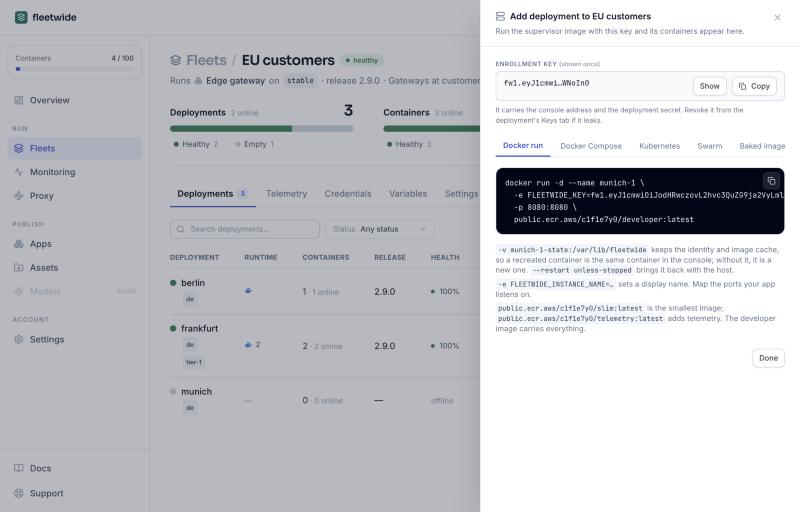
docker run -d --name web-1 --restart unless-stopped \
  -v web-1-state:/var/lib/fleetwide \
  -e FLEETWIDE_KEY=fw1.eyJ1cmwiOiJodHRwczovL2FnZW50cy5mbGVldHdpZGUu… \
  -p 8080:8080 public.ecr.aws/fleetwide/slim:latest
services:
web:
image: public.ecr.aws/fleetwide/slim:latest
restart: unless-stopped
environment:
FLEETWIDE_KEY: fw1.eyJ1cmwiOiJodHRwczovL2FnZW50cy5mbGVldHdpZGUu…
volumes:
- web-1-state:/var/lib/fleetwide
ports: ["8080:8080"]
volumes:
web-1-state:docker service create --name web --replicas 3 \
-e FLEETWIDE_KEY=fw1.… \
--mount 'type=volume,source=web-{{.Task.Slot}}-state,target=/var/lib/fleetwide' \
-p 8080:8080 public.ecr.aws/fleetwide/slim:latestFor Kubernetes and k3s, see Kubernetes and k3s.
New key on a deployment's Keys tab mints another: the panel shows the run command for it and what the containers already running need (they keep working on their old key; change FLEETWIDE_KEY where the container is defined so a recreated one enrolls on the new key). Keys can be capped, expire and be disabled.
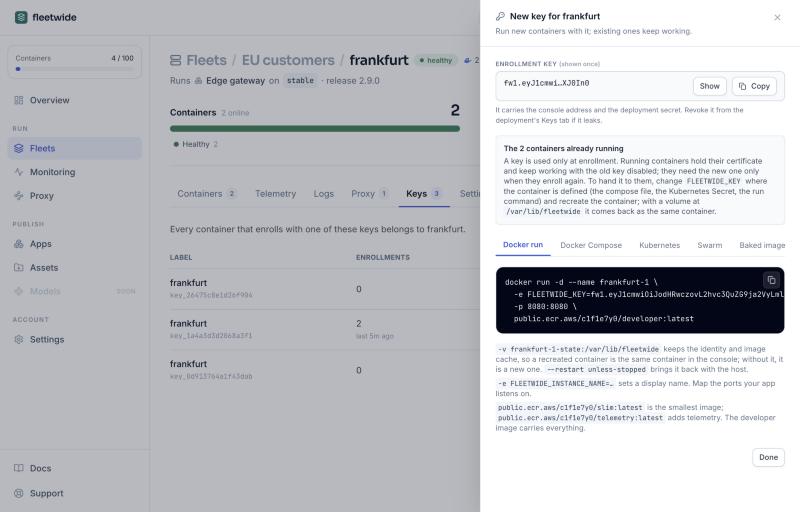
Keys are reusable: keep one in a Kubernetes Secret or a Compose file and a recreated container enrolls again. The volume at /var/lib/fleetwide holds the identity certificate, the layer cache and the current and previous releases, so a restart resumes without the console and without the key, and a rollback needs no network.
The supervisor image is published for linux/amd64 and linux/arm64 at public.ecr.aws/fleetwide/slim, public.ecr.aws/fleetwide/telemetry and public.ecr.aws/fleetwide/developer. Use the latest tag: the supervisor is backward compatible with every release it has ever applied, and the console shows which version each container runs. The install panel names the image your fleet needs. On the supervisor runtime the container runs as root so it can write your image over its own filesystem and then drops to your image's user for the app; it needs the capabilities Docker grants by default (CHOWN, DAC_OVERRIDE, FOWNER, FSETID, SETUID, SETGID, KILL) and reports if any is missing. Where that is not allowed, use the embedded runtime.