Fleetwide Proxy
A proxy opens one container port of a deployment at https://<name>.fleetwide.app. The supervisor opens a single outbound connection to the proxy and requests flow back through it, so the customer opens no inbound port, runs no VPN and needs no public address. It needs the fleet's proxy switch and the developer supervisor image.
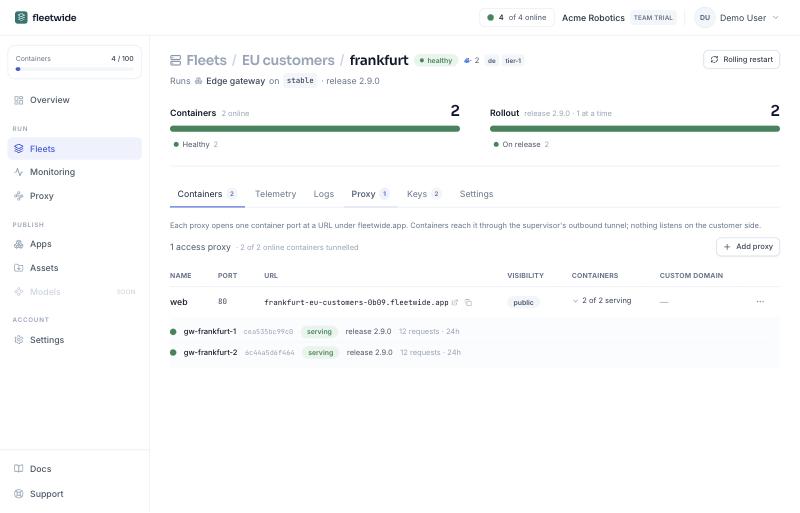
Proxy, under Run, lists every proxy in the organization: name, fleet and deployment, URL, visibility, custom domain and how many of the deployment's containers are serving. A row expands to each container's standing on the port (serving, no tunnel yet, nothing listening, updating, an image without the feature) with the release it runs and the requests it served in the last day. Filter by fleet, app or deployment. Add proxy asks for the deployment first; a deployment's own Proxy tab shows the same rows for that deployment.
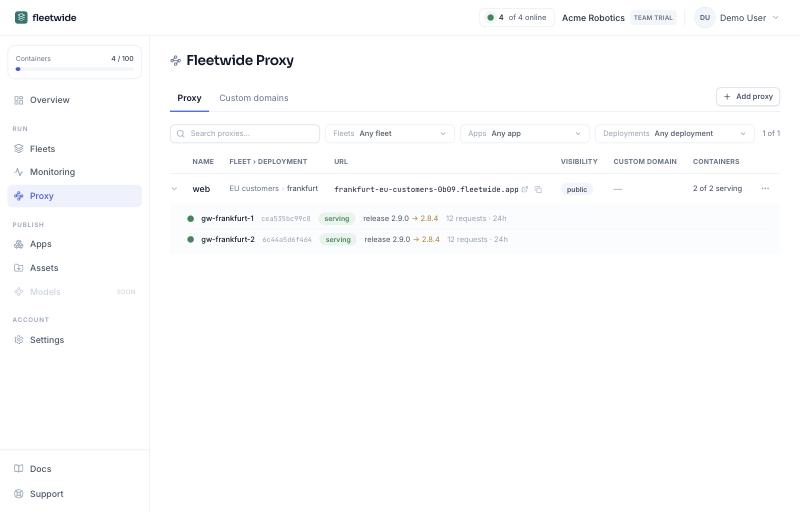
Every container, one URL. Requests are spread across the deployment's containers in turn, on every proxy node, and a container that goes away leaves the rotation at once; the counts in the expanded row show the spread. While a container is updating, the proxy serves the old release until the swap; the swap itself is a few hundred milliseconds of downtime.
Visibility. Public is anyone with the URL. Sign-in required (Team plan) admits members of your organization signed in to the console, or an org API token as a bearer for curl and tools; a sign-in is good for twelve hours per host. The Host header the app receives is localhost:<port> by default, which dev servers expect, or the browser's own under Advanced.
Where root is not allowed, the embedded runtime opens the tunnel the same way. For reaching from the container into the customer's network, see Fleetwide Bridge.